EdTech Studio Ecosystem
Redesigning a Multi Product Creation Platform and Establishing Its Design System
Lead Product Designer, End-to-end UX & UI
1 Product Designer (Part-time), 6 Devs, 3 PMs, 3 QAs
3 years
Lead Product Designer, End-to-end UX & UI
1 Product Designer (PT), 6 Devs, 3 PMs, 3 QAs
3 years
TL;DR
A unified content creation system designed for scale
Impact:
Eliminated developer bottlenecks by replacing fragmented legacy tools with a unified creation system, cutting content unit production from weeks to days (~75% faster).
Solution:
A unified content studio and design system, built for cross-platform scale, consolidating fragmented patterns into one system with reusable components, eliminating developer dependency.
Key takeaway:
Good product design starts with clarity, shared understanding, and systems that support people when it matters most.
TL;DR
A unified content creation system designed for scale
Impact:
Eliminated developer bottlenecks by replacing fragmented legacy tools with a unified creation system, cutting content unit production from weeks to days (~75% faster).
Solution:
A unified content studio designed for cross-platform scale, consolidating fragmented patterns into one system and eliminating developer dependency.
Key takeaway:
Good product design starts with clarity, shared understanding, and systems that support people when it matters most.
TL;DR
A unified content creation system designed for scale
Impact:
Eliminated developer bottlenecks by replacing fragmented legacy tools with a unified creation system, cutting content unit production from weeks to days (~75% faster).
Solution:
A unified content studio and design system, built for cross-platform scale, consolidating fragmented patterns into one system with reusable components, eliminating developer dependency.
Key takeaway:
Good product design starts with clarity, shared understanding, and systems that support people when it matters most.
CONTEXT
Designing at the Scale of a National Education System
CET, the Center for Educational Technology, is one of Israel’s largest and most established EdTech organizations, working closely with the Ministry of Education and reaching a significant share of the public school system.
Behind the scale of CET’s learning products lies a complex content creation reality, involving:
Multiple content types
Varied pedagogical approaches
Diverse audiences
The Studio defines how learning content is created, structured, and scored.
CONTEXT
Designing at the Scale of a National Education System
CET, the Center for Educational Technology, is one of Israel’s largest and most established EdTech organizations, working closely with the Ministry of Education and reaching a significant share of the public school system.
Behind the scale of CET’s learning products lies a complex content creation reality, involving:
Multiple content types
Varied pedagogical approaches
Diverse audiences
The Studio defines how learning content is created, structured, and scored.
CONTEXT
Designing at the Scale of a National Education System
CET, the Center for Educational Technology, is one of Israel’s largest and most established EdTech organizations, working closely with the Ministry of Education and reaching a significant share of the public school system.
Behind the scale of CET’s learning products lies a complex content creation reality, involving:
Multiple content types
Varied pedagogical approaches
Diverse audiences
The Studio defines how learning content is created, structured, and scored.
Before redesigning, we had to agree on how creation itself should work:
STRATEGY & FOUNDATIONS
Aligning teams around a scalable creation model
The
Challenge
Transforming fragmented, developer-dependent content creation into a shared, scalable system.
The
Challnge
Transforming fragmented, developer-dependent content creation into a shared, scalable system.
How we
Worked
Working closely with LXDs, PMs, and engineers, we aligned terminology, resolved dependencies, and built shared foundations for future work.
Design
Principles
Design
Principles
CONTEXT
Designing at the Scale of a National Education System
CET, the Center for Educational Technology, is one of Israel’s largest and most established EdTech organizations, working closely with the Ministry of Education and reaching a significant share of the public school system.
Behind the scale of CET’s learning products lies a complex content creation reality, involving:
Multiple content types
Varied pedagogical approaches
Diverse audiences
The Studio defines how learning content is created, structured, and scored.
CONTEXT
Designing at the Scale of a National Education System
CET, the Center for Educational Technology, is one of Israel’s largest and most established EdTech organizations, working closely with the Ministry of Education and reaching a significant share of the public school system.
Behind the scale of CET’s learning products lies a complex content creation reality, involving:
Multiple content types
Varied pedagogical approaches
Diverse audiences
The Studio defines how learning content is created, structured, and scored.
Before redesigning, we had to agree on how creation itself should work:
STRATEGY & FOUNDATIONS
Aligning teams around a scalable creation model
The
Challenge
Transforming fragmented, developer-dependent content creation into a shared, scalable system.
How we
Worked
Working closely with LXDs, PMs, and engineers, we aligned terminology, resolved dependencies, and built shared foundations for future work.
Design
Principles
USERS & PAIN POINTS
The People Behind the Content, and the Friction They Faced
We worked closely with the people creating learning content every day: LXDs - Learning eXperience Designers, pedagogical experts, and teachers. Each group faced different challenges, but all were slowed down by the same system limitations.

LXDs
The old Studio isn’t responsive. Nothing stays consistent. We need reusable components.
The Pain: Fragmented tools and inconsistent patterns made it hard to create reusable learning units.
92% of interviewees
Struggled to create consistent, reusable content across units.
LXDs
The old Studio isn’t responsive. Nothing stays consistent. We need reusable components.
The Pain: Fragmented tools and inconsistent patterns made it hard to create reusable learning units.
92% of interviewees
Struggled to create consistent, reusable content across units.
Pedagogical Experts
Building a unit takes too long, and the tools doesn’t match how we think about learning.
The Pain: Slow, design-heavy tools didn’t match pedagogical thinking or daily creation needs.
61% of interviewees
Wanted faster creation flows and clearer collaboration
Pedagogical Experts
Building a unit takes too long, and the tools doesn’t match how we think about learning.
The Pain: Slow, design-heavy tools didn’t match pedagogical thinking or daily creation needs.
61% of interviewees
Wanted faster creation flows and clearer collaboration
Pedagogical Experts
Building a unit takes too long, and the tools doesn’t match how we think about learning.
The Pain: Slow, design-heavy tools didn’t match pedagogical thinking or daily creation needs.
61% of interviewees
Wanted faster creation flows and clearer collaboration
Teachers
The Studio stressed me out.
I just want to quickly edit content without dealing with design.
The Pain: Creating or adapting content felt overly complex for everyday teaching needs.
78% of interviewees
Found the old editor intimidating or hard to edit existing materials
Teachers
The Studio stressed me out.
I just want to quickly edit content without dealing with design.
The Pain: Creating or adapting content felt overly complex for everyday teaching needs.
78% of interviewees
Found the old editor intimidating or hard to edit existing materials
Teachers
The Studio stressed me out.
I just want to quickly edit content without dealing with design.
The Pain: Creating or adapting content felt overly complex for everyday teaching needs.
78% of interviewees
Found the old editor intimidating or hard to edit existing materials
THE PROBLEM
Old Tools, Heavy Friction, No Design System
Creating content meant juggling tools, relying on developers, and working in an old, frustrating interface, and building without a shared component library.
Legacy Studio question editor with dense, modal-based workflows
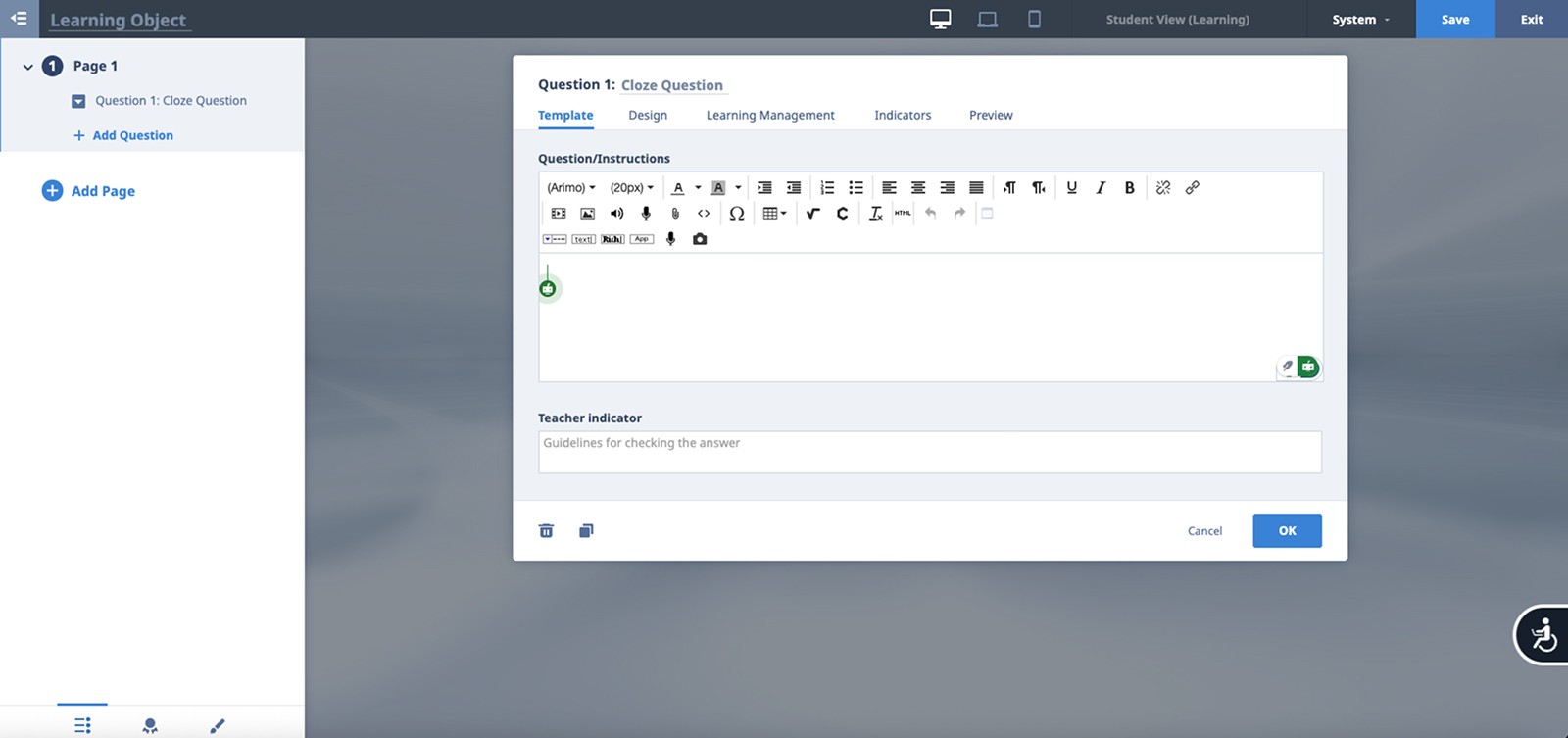
Legacy Studio question editor with dense, modal-based workflows
Legacy Studio question editor with dense, modal-based workflows
Duplicated work across tools
Duplicated work across tools
Inconsistent mental models
Inconsistent mental models
Inconsistent mental models
Slow production cycles
Slow production cycles
Heavy onboarding
Heavy onboarding
The organization needed a single, cohesive place, with a shared design system, to create, manage, and evolve learning content at scale.
SOLUTION ARCHITECTURE
A Unified UGC Creation System
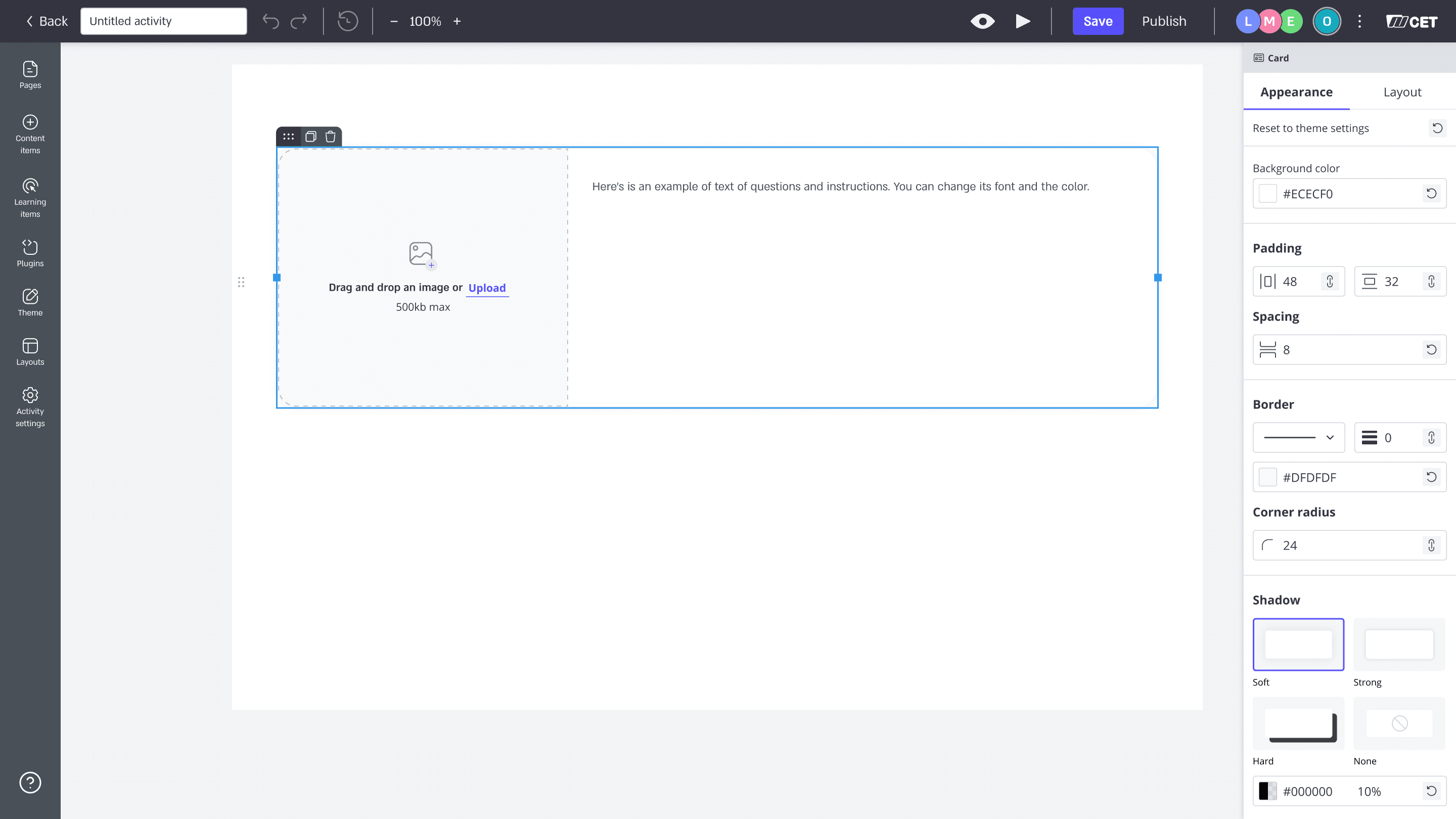
We redesigned the Studio into a unified system with shared templates, reusable blocks, and an editable theme system.
Consistent structure enabled faster, scalable content creation.
Scalable Content Model
Learning units share one structure, with different rules and permissions across activity types.
Learning Unit
(shared structure)
Sections (Structural Containers)
Widgets (Content blocks)
Config (behavior, rules)
Unit type
Template
(structure, rules)
Types change rules and access
Group project
(Long term)
Evaluation
Self-paced learning
In-class
lesson
Learning Unit
(shared structure)
Sections (Structural Containers)
Widgets (Content blocks)
Config (behavior, rules)
Unit type
Template
(structure, rules)
Types change rules and access
Group project
(Long term)
Evaluation
Self-paced learning
In-class
lesson
PRODUCT DECISIONS: SHAPING the SYSTEM
PRODUCT DECISIONS: SHAPING the SYSTEM
PRODUCT DECISIONS: SHAPING the SYSTEM
To support effortless, consistent, and scalable content creation, we made a set of core product decisions:
01
Unified Authoring Environment
A single workspace replaced multiple tools, enabling the creation of any content type within one structured model.
Creation became about designing learning, not managing tools.
01
Unified Authoring Environment
A single workspace replaced multiple tools, enabling the creation of any content type within one structured model.
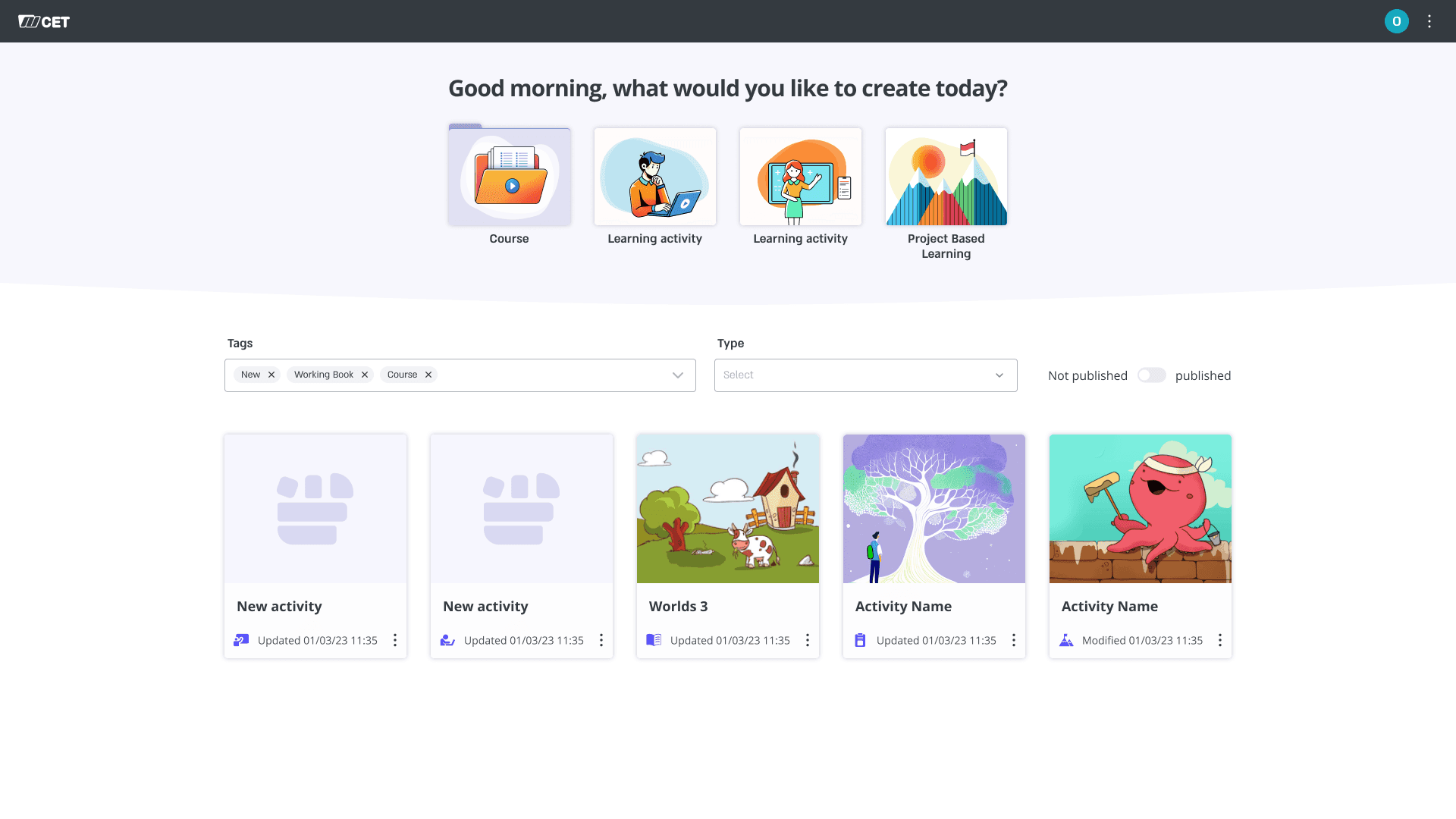
Creation became about designing learning, not managing tools.
01
Unified Authoring Environment
A single workspace replaced multiple tools, enabling the creation of any content type within one structured model.
Creation became about designing learning, not managing tools.
02
Predictable Interaction Patterns
Building blocks have individual options but follow consistent rules. This makes interactions predictable and easier to learn.
No more guesswork between tools.
02
Predictable Interaction Patterns
Building blocks have individual options but follow consistent rules. This makes interactions predictable and easier to learn.
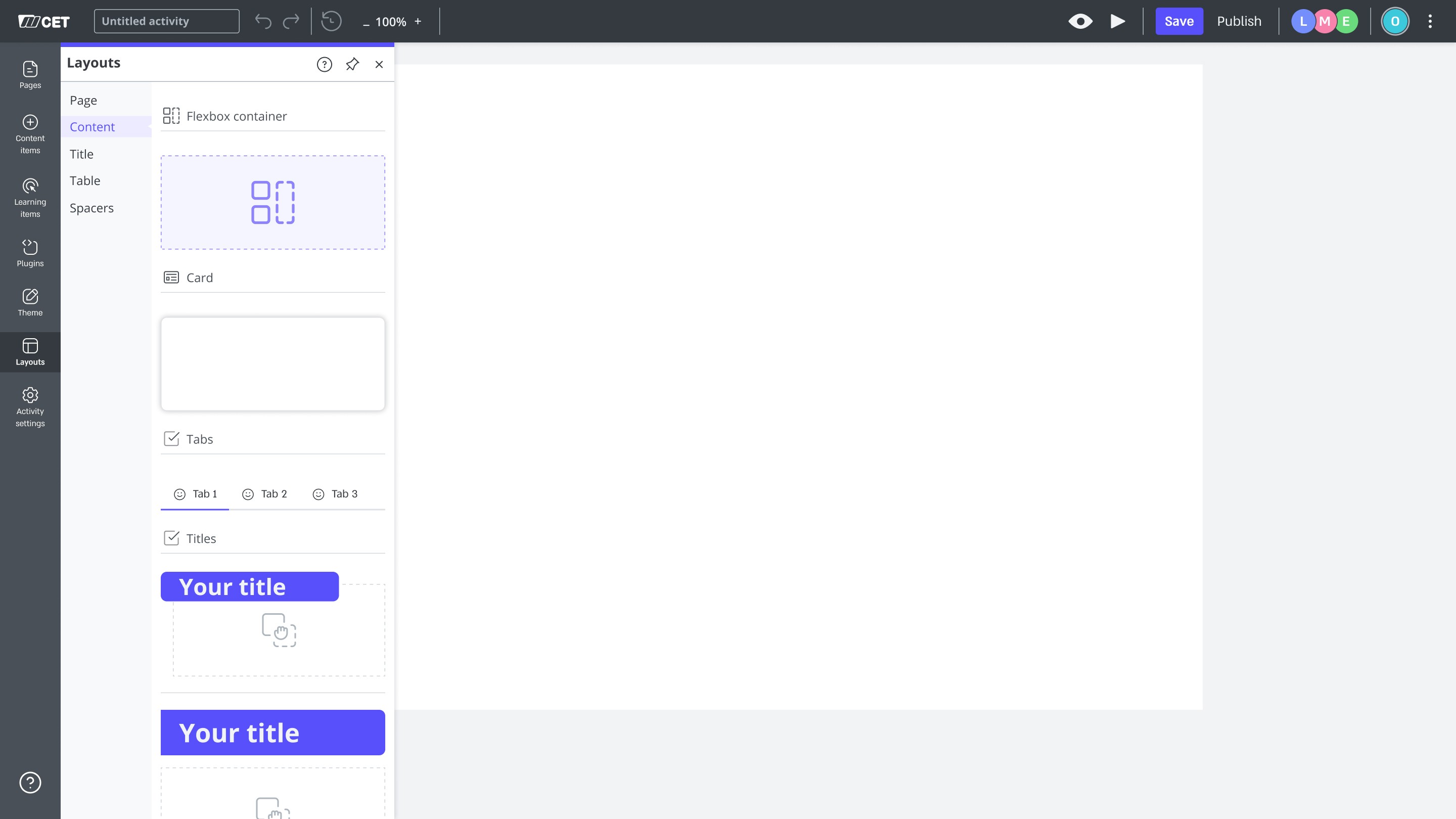
No more guesswork between tools.
02
Predictable Interaction Patterns
Building blocks have individual options but follow consistent rules. This makes interactions predictable and easier to learn.
No more guesswork between tools.
03
Clear layout rules across platforms
Layout control lives in cards and questions, while sections handle structure and responsiveness.
Now content behaves consistently across screen sizes.
03
Clear layout rules across platforms
Layout control lives in cards and questions, while sections handle structure and responsiveness.
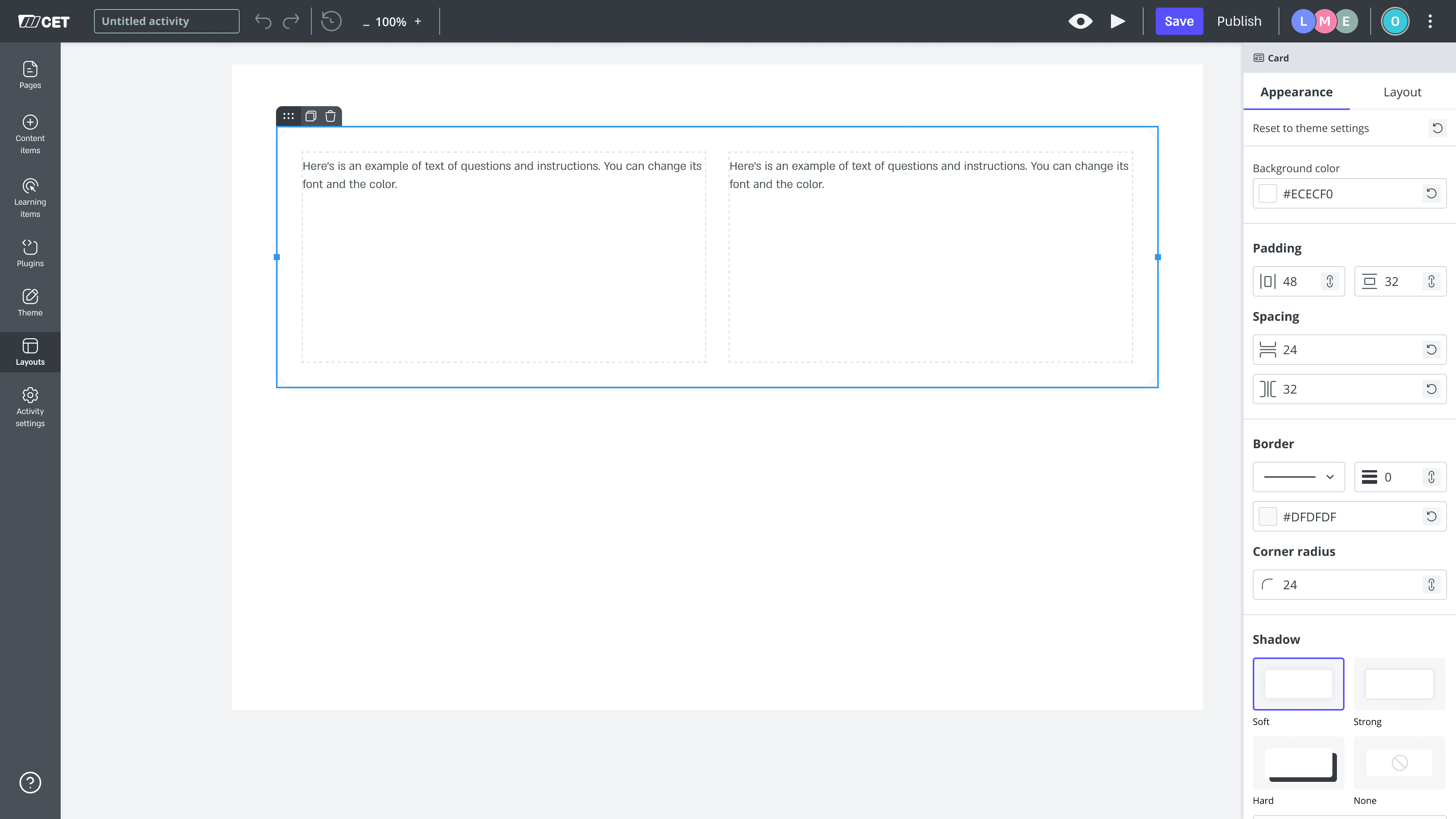
Now content behaves consistently across screen sizes.
03
Clear layout rules across platforms
Layout control lives in cards and questions, while sections handle structure and responsiveness.
Now content behaves consistently across screen sizes.
04
Rule-based responsive grid
We used a rule-based grid instead of manual breakpoints to keep layouts predictable across devices.
This reduced complexity for creators while maintaining stable behavior at scale.
04
Rule-based responsive grid
We used a rule-based grid instead of manual breakpoints to keep layouts predictable across devices.
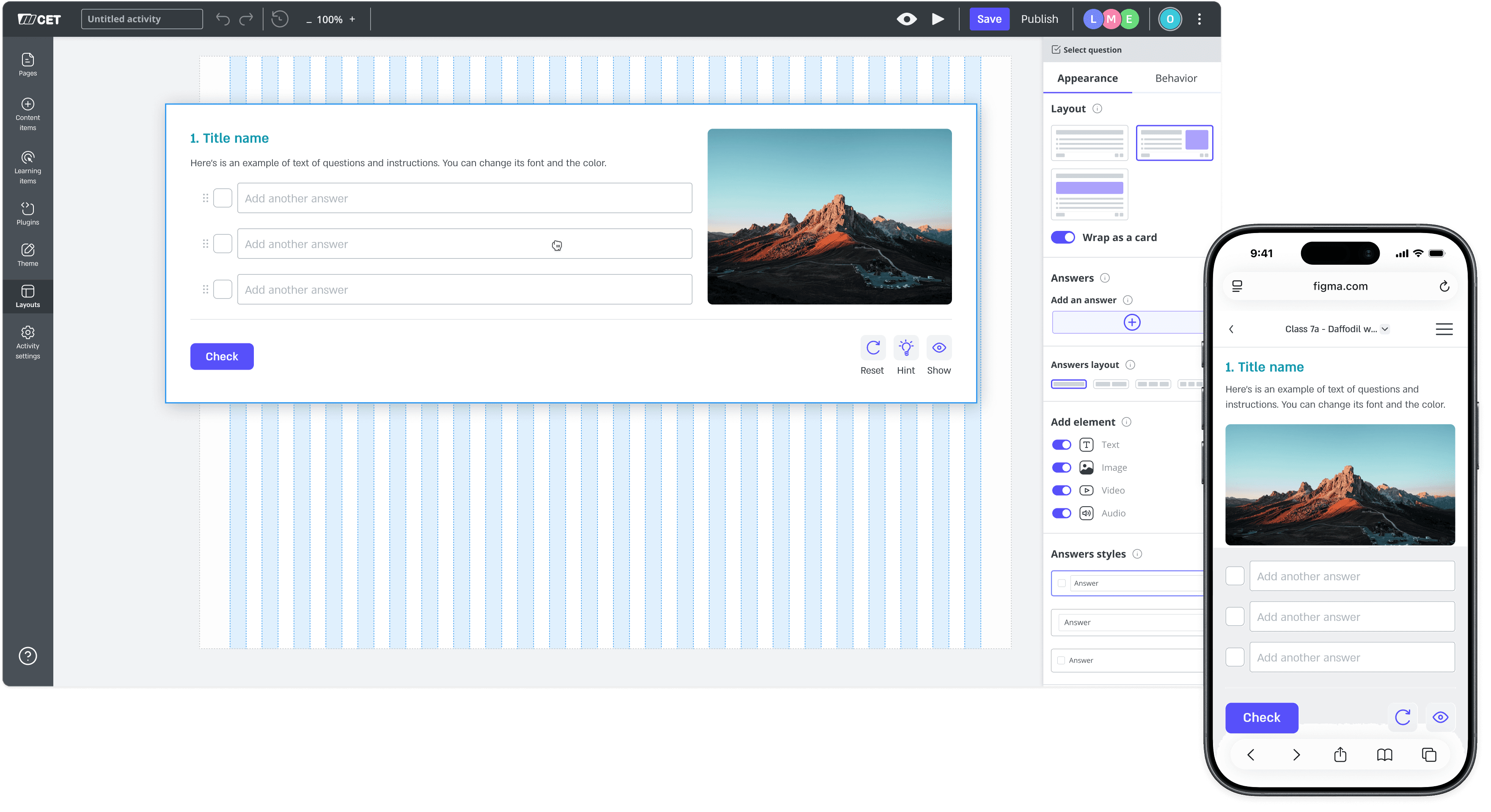
This reduced complexity for creators while maintaining stable behavior at scale.
04
Rule-based responsive grid
We used a rule-based grid instead of manual breakpoints to keep layouts predictable across devices.
This reduced complexity for creators while maintaining stable behavior at scale.
05
Building a Design System from Scratch
I designed and built CET's first design system from scratch, defining the tokens, components, and architecture used across every content type.
I paired with engineering on the Storybook build, keeping design and code aligned from Figma to production.
05
Building a Design System from Scratch
I designed and built CET's first design system from scratch, defining the tokens, components, and architecture used across every content type.

I paired with engineering on the Storybook build, keeping design and code aligned from Figma to production.
05
Building a Design System from Scratch
I designed and built CET's first design system from scratch, defining the tokens, components, and architecture used across every content type.
I paired with engineering on the Storybook build, keeping design and code aligned from Figma to production.
06
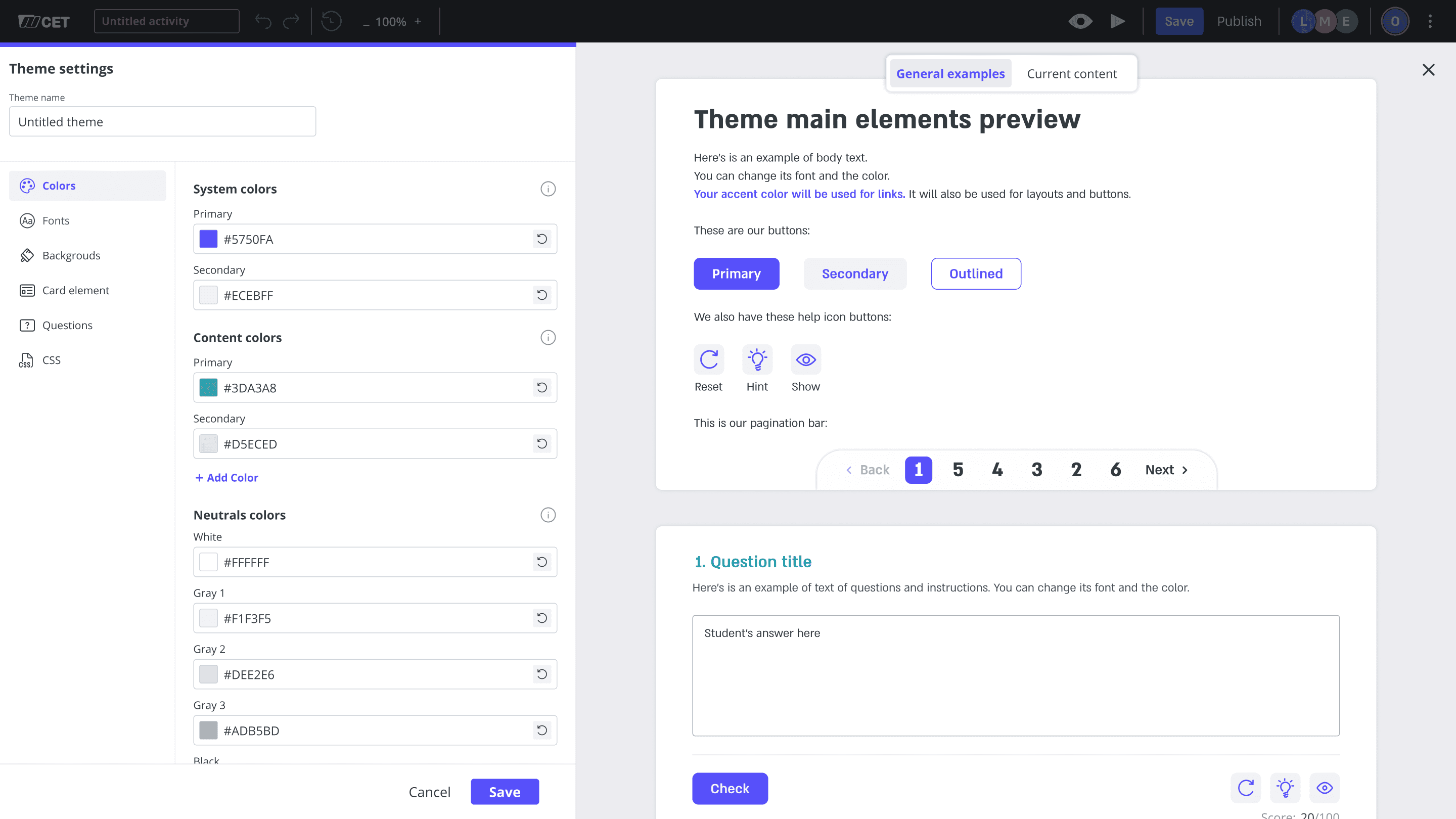
Shared Building Blocks & Theme System
Shared building blocks and a centralized theme system enabled faster authoring with built-in consistency.
Consistency was built into the system, not maintained manually
06
Shared Building Blocks & Theme System
Shared building blocks and a centralized theme system enabled faster authoring with built-in consistency.
Consistency was built into the system, not maintained manually
06
Shared Building Blocks & Theme System
Shared building blocks and a centralized theme system enabled faster authoring with built-in consistency.
Consistency was built into the system, not maintained manually
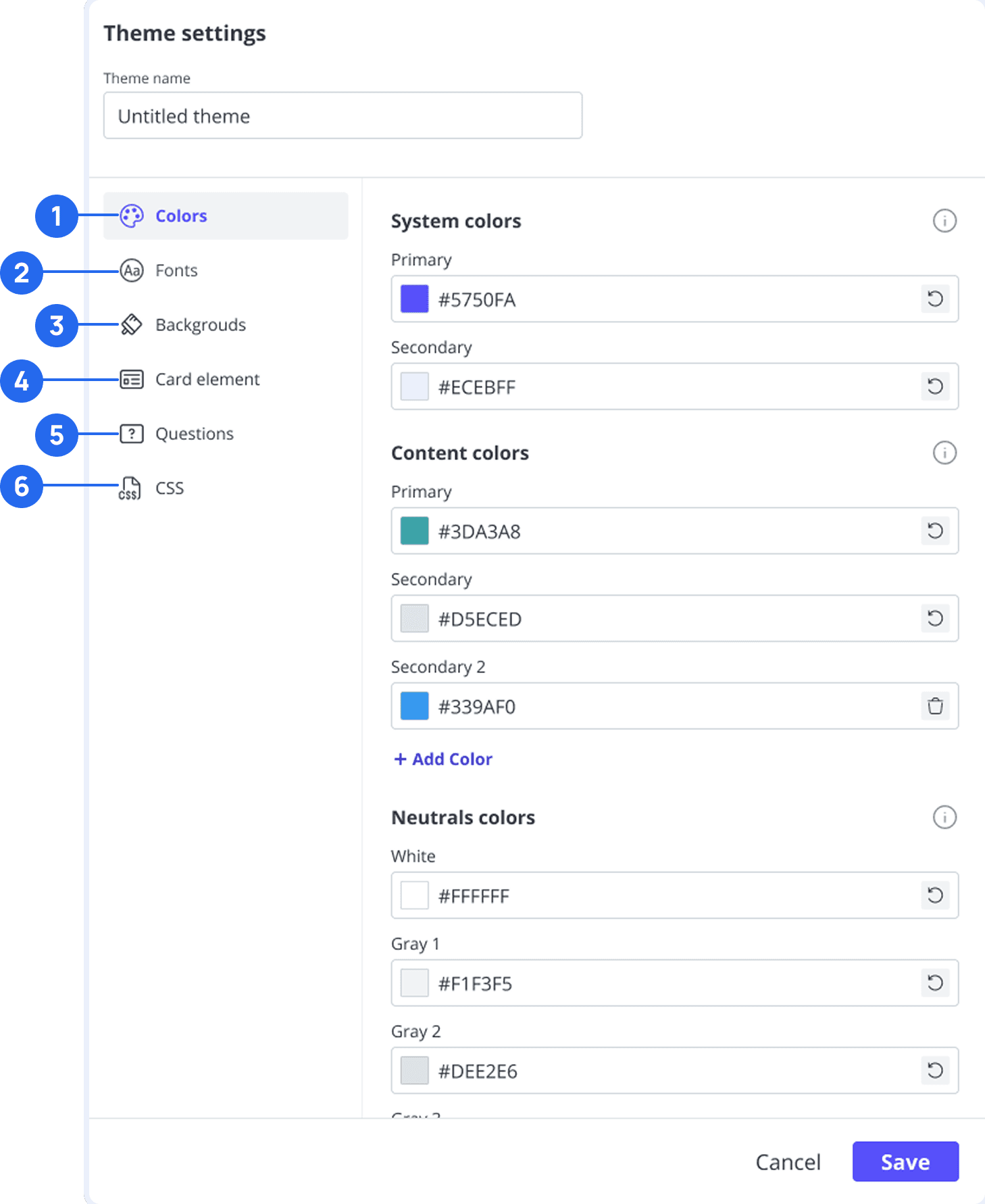
The theme system brought visual control into one place across activities and courses.
The theme system brought visual control into one place across activities and courses.
1
Colors
Define global color styles once, applied consistently across all activities.
2
Fonts
Set typography rules that stay consistent across content and formats.
3
Backgrounds
Control page backgrounds centrally to maintain visual consistency.
4
Card Element
Style cards and layouts through shared, predefined settings.
5
Questions
Apply a unified look and behavior to all interactive items.
6
CSS
Full freedom for experts to customize beyond presets.
Consistent content
Less effort
Easier maintenance
Consistent content
Less effort
Easier maintenance
IMPACT
From Legacy Playback to Live Interaction
The new Studio was introduced in early 2025 and continued evolving alongside real-world use.
First full implementation: a new science course
Used in classes by teachers and students
Real-World Rollout
First full implementation: a new science course.
Used in classes by teachers and students.
Real-World Rollout
Unified content model makes AI integration possible
Enables future AI-based authoring tools
AI-Ready Foundation
Unified content model makes AI integration possible.
Enables future AI-based authoring tools.
AI-Ready Foundation
Dev-Free Authoring
Content creators build and adapt units on their own, using templates, layouts, and themes, without relying on developers.
Unified authoring and playback logic
Reduced long-term maintenance and technical debt
Operational Efficiency
Unified authoring and playback logic.
Reduced long-term maintenance and technical debt.
Operational Efficiency
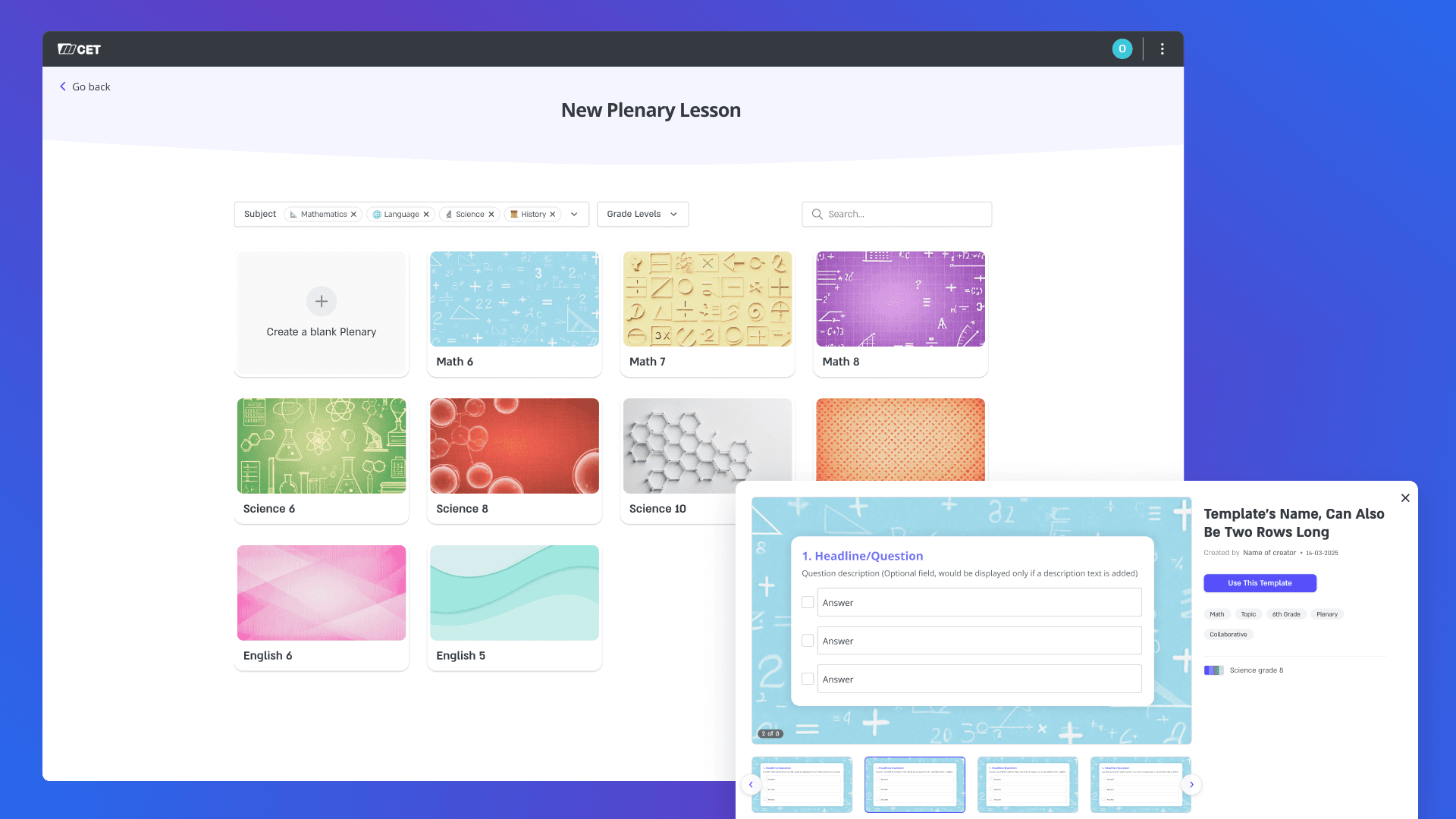
Template-based creation with live preview, enabling independent authoring at scale
Template-based creation with live preview, enabling independent authoring at scale
Template-based creation with live preview, enabling independent authoring at scale
DESIGN TRADEOFFS & LEARNINGS
01
Designing With Collaboration
Early alignment between product, UX, and development is critical when designing systems meant to scale.
02
User Needs vs Constraints
Understanding both user workflows and technical limits led to faster, more realistic decisions.
03
Thinking in Systems
System thinking, reusable patterns, and clear hierarchies proved essential for building products that can evolve.
This project reinforced my belief in clarity, shared understanding, and systems that support people when it matters most.
DESIGN TRADEOFFS & LEARNINGS
01
Designing With Collaboration
Early alignment between product, UX, and development is critical when designing systems meant to scale.
02
User Needs vs Constraints
Understanding both user workflows and technical limits led to faster, more realistic decisions.
03
Thinking in Systems
System thinking, reusable patterns, and clear hierarchies proved essential for building products that can evolve.
This project reinforced my belief in clarity, shared understanding, and systems that support people when it matters most.
REFLECTIONS & KEY LEARNINGS
01
Designing Scale Through Collaboration
Early alignment between product, UX, and development is critical when designing systems meant to scale across multiple content types and formats.
02
Bridging User Needs and Technical Constraints
Understanding both user workflows and technical constraints enabled faster, more realistic decisions that balanced vision with feasibility.
03
Seeing the System, Not Just the Screen
The ability to think in systems, hierarchies, and reusable patterns proved essential in shaping a product that could evolve beyond its use cases.
This project reinforced my belief that good product design starts with clarity, shared understanding, and systems that support people when it matters most.
Next Project